The network switch is one of the most important components of business IT infrastructure.
Computers, IP phones, wireless access points, surveillance cameras, servers, printers, access-control systems, and other network devices often depend on switches to communicate with each other and reach business applications or the internet.
Yet switches are frequently selected using only one question: How many Ethernet ports do we need?
Port count matters, but it is only the beginning.
A business deploying ten computers has very different requirements from an organisation supporting Wi-Fi access points, VoIP phones, dozens of IP cameras, servers, multiple floors, or several buildings. The correct network switch must support both current traffic and future expansion without creating unnecessary complexity or cost.
For businesses in Egypt, evaluating management capabilities, Power over Ethernet, switching speed, fibre uplinks, network segmentation, security, and scalability before purchasing can help prevent costly infrastructure limitations later.
ProVAD currently provides PLANET switching solutions in Egypt covering unmanaged, managed, PoE, industrial, Gigabit, multi-Gigabit, and 10G network requirements.
1. Start With What the Switch Needs to Connect
Before comparing switch models, document every device that will connect to the network.
These may include:
- Desktop computers
- IP phones
- Wireless access points
- IP surveillance cameras
- Printers
- Network-attached storage
- Servers
- Access-control devices
- Video-conferencing systems
- Digital signage
- Other switches
Then consider what may be added during the next few years.
If 20 ports are required today, purchasing a 24-port switch may leave very little capacity for expansion. A larger switch or an architecture designed around additional access switches may provide greater flexibility.
Do not count only physical devices. Consider whether uplink ports, firewalls, routers, servers, or inter-switch connections will also consume available interfaces.
2. Managed or Unmanaged Switch?
This is one of the most important purchasing decisions.
Unmanaged Switches
An unmanaged switch normally provides basic plug-and-play Ethernet connectivity.
It can be appropriate for:
- Very small offices
- Simple isolated networks
- Temporary installations
- Environments with no VLAN or monitoring requirements
The advantage is simplicity. However, the administrator has limited visibility and control.
Managed Switches
Managed switches provide configuration and monitoring capabilities that become increasingly important as the network grows.
Depending on the model, these may include:
- VLANs
- Quality of Service
- Link aggregation
- Spanning Tree
- IGMP snooping
- Access Control Lists
- Port security
- SNMP monitoring
- 802.1X authentication
- Bandwidth control
- Secure SSH or HTTPS management
PLANET managed switches range from Layer 2 access products to Layer 2+ and Layer 3 platforms with routing and more advanced enterprise functions.
For most businesses operating IP phones, multiple departments, Wi-Fi networks, CCTV, or critical applications, managed switching provides significantly greater control.
Click here to discover PLANET Switches portfolio for business in Egypt.
3. Choose the Right Port Speed
Gigabit Ethernet remains suitable for many everyday business endpoints.
A standard desktop computer, IP phone, printer, or conventional IP camera may not require more than a 1Gbps connection.
However, faster access speeds are becoming increasingly relevant for:
- Wi-Fi 6 and Wi-Fi 7 access points
- Network storage
- High-performance workstations
- Video production
- High-resolution surveillance
- Servers
Multi-Gigabit switches can provide 2.5Gbps connectivity while retaining familiar Ethernet cabling in compatible installations.
PLANET's MGS-6311-8UP4X, for example, combines eight 2.5GBASE-T PoE++ interfaces with four 10G SFP+ uplinks and is designed for high-bandwidth devices including modern wireless access points, NAS platforms, and workstations.
The objective is not to buy the fastest switch available. Instead, match access-port speed and uplink capacity to the applications being connected.
4. Understand the Importance of Uplink Speed
A switch may provide 24 or 48 Gigabit access ports, but all of that traffic eventually needs to move toward servers, another switch, or the network core.
If the uplink becomes congested, fast access ports alone cannot solve the problem.
Common uplink options include:
- 1G Ethernet
- Gigabit SFP fibre
- 10G SFP+
- Multi-Gigabit connections
For a small office, a Gigabit uplink may be sufficient. Larger networks, high-density Wi-Fi deployments, surveillance environments, and multi-switch architectures may benefit from 10G fibre uplinks.
Fibre also becomes useful when switches must be connected over longer distances or between different floors or buildings.
5. Do You Need Power over Ethernet?
Power over Ethernet allows compatible switches to deliver both network data and electrical power through Ethernet cabling.
It is commonly used with:
- IP phones
- Wireless access points
- IP cameras
- Video intercoms
- Access-control devices
- Selected displays and IoT devices
PLANET offers switches supporting PoE, PoE+, and higher-power 802.3bt PoE++ applications. Some current PoE++ models provide up to 95 watts per supported port, depending on the device and configuration.
However, the most important specification is not simply whether the switch supports PoE.
You must also calculate the total PoE power budget.
For example, if several cameras and access points are connected, their combined power requirements must remain within the switch's available budget.
Before purchasing, document:
- How many devices require PoE?
- What PoE standard does each device require?
- What is each device's maximum power consumption?
- What is the switch's total PoE budget?
- Will more powered devices be added later?
For a more detailed comparison, check the blog post about choosing the right PLANET PoE Switch for your next deployment.
6. Use VLANs to Separate Business Traffic
A business network should not necessarily operate as one large flat network.
VLANs can logically separate traffic even when devices use the same physical switching infrastructure.
An organisation might create separate VLANs for:
- Employee computers
- IP phones
- Surveillance cameras
- Servers
- Guest Wi-Fi
- Management devices
- Access control
This can simplify administration, improve traffic management, and form part of a broader network-security architecture.
Managed PLANET switches support VLAN functions across many product families, with more advanced models also offering ACLs, authentication, DHCP snooping, IP Source Guard, and Dynamic ARP Inspection.
7. Consider Quality of Service for Voice and Video
Voice and real-time video are sensitive to delay.
When a network becomes congested, a large file transfer should not necessarily have the same priority as a business phone call or live video session.
Quality of Service, or QoS, allows managed switches to prioritise selected traffic.
This can be particularly important for networks supporting:
- VoIP
- IP PBX systems
- Video conferencing
- Microsoft Teams Rooms
- Surveillance video
- Real-time business applications
QoS does not replace sufficient bandwidth. However, it can help administrators control how available capacity is allocated during busy periods.
8. Layer 2, Layer 2+, or Layer 3?
Not every organisation needs a Layer 3 switch.
Layer 2
Suitable for switching traffic within VLANs and many standard access-network environments.
Layer 2+
Often adds functions such as static routing while retaining a switching-focused architecture.
Layer 3
Adds more advanced routing capabilities and is useful when the switch needs to route traffic between VLANs or form part of a larger enterprise core or aggregation network.
PLANET's Layer 3 portfolio includes models offering dynamic routing capabilities such as OSPF, RIP, and VRRP alongside high-speed Ethernet and fibre connectivity.
For a normal small office, this level of routing may be unnecessary. For larger campuses, multi-VLAN environments, data centres, or complex branch networks, Layer 3 capabilities can reduce dependence on an external router for every internal traffic flow.
9. Check Network Security Features
Switch security is increasingly important because the switch controls access to the physical network.
Business buyers should look for features appropriate to their security design, including:
- 802.1X authentication
- Access Control Lists
- Port security
- DHCP snooping
- IP Source Guard
- Dynamic ARP Inspection
- SSH
- HTTPS
- SNMPv3
- Management VLANs
For example, PLANET's WGS-4215-8HP2S supports ACLs, 802.1X, DHCP snooping, IP Source Guard, Dynamic ARP Inspection, SSHv2, TLS and SNMPv3 management capabilities.
These features should complement firewalls, endpoint security, identity controls, and appropriate network segmentation rather than replace them.
10. Consider Reliability and Redundancy
One switch failure can disconnect dozens of users or devices.
For critical environments, consider whether the architecture requires:
- Redundant uplinks
- Link aggregation
- Spanning Tree
- Dual power supplies
- Multiple switches
- Fibre redundancy
- Ring networking
- Backup core infrastructure
Not every small office requires extensive redundancy. However, organisations should identify the cost of downtime before deciding how much resilience is necessary.
Industrial and mission-critical environments may require rugged switches with redundant power and fast ring recovery rather than conventional office hardware. ProVAD's industrial-networking guide covers these requirements in greater detail.
Quick Network Switch Selection Guide
| Business Requirement | Recommended Direction |
|---|---|
| Small office with basic computers and printers | Gigabit unmanaged or entry managed switch |
| Office with VoIP and departmental networks | Managed Gigabit switch with VLAN and QoS |
| IP phones, Wi-Fi APs or cameras | Managed PoE/PoE+ switch |
| High-power APs, cameras or devices | PoE++ switch with sufficient power budget |
| High-density wireless network | Multi-Gigabit access ports |
| Several switches or high traffic | 10G fibre uplinks |
| Multiple VLANs requiring internal routing | Layer 2+ or Layer 3 switch |
| Large enterprise backbone | Layer 3 aggregation/core switch |
| Factory or harsh environment | Industrial Ethernet switch |
The exact model should always be based on actual traffic, device, power, security, and environmental requirements.
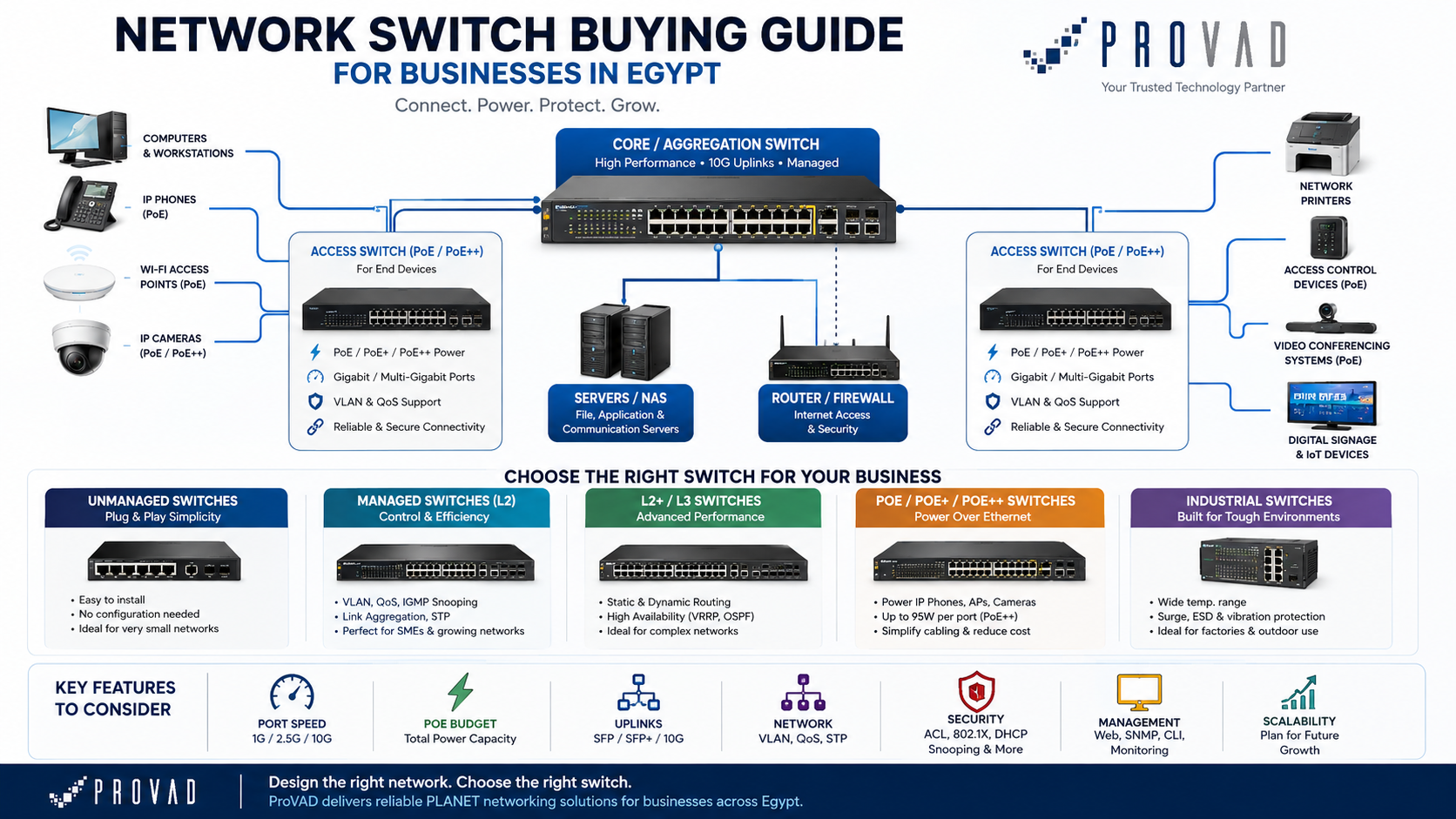
Common Network Switch Buying Mistakes
Businesses can avoid many infrastructure problems by not making these common mistakes:
- Buying exactly the number of ports required today
- Ignoring PoE power budget
- Selecting only by price
- Using unmanaged switches throughout a growing enterprise network
- Assuming every port must be only 1G
- Forgetting uplink capacity
- Ignoring fibre requirements
- Mixing critical and guest devices without segmentation
- Buying a Layer 3 switch when Layer 2 is sufficient
- Buying office equipment for industrial conditions
- Ignoring monitoring and network-management requirements
The cheapest switch at purchase may become expensive if it needs to be replaced when new access points, cameras, employees, or applications are added.
Why Choose PLANET Network Switches?
PLANET provides a broad switching portfolio ranging from simple Ethernet access to enterprise, PoE, multi-Gigabit, fibre, Layer 3, and industrial networking.
Current PLANET solutions include Gigabit and 10G switching, managed and unmanaged configurations, PoE and PoE++, Layer 2 and Layer 3 management, rackmount and industrial form factors, and fibre connectivity.
This range allows organisations to select infrastructure according to the actual deployment instead of forcing one switch type into every use case.
Why Work with ProVAD?
ProVAD is an authorised PLANET Technology partner and distributor in Egypt, supporting PLANET product import, logistics, warranty services, network-design consultation, and local availability.
ProVAD can help partners and business customers assess:
- Number and type of network devices
- Managed versus unmanaged requirements
- Gigabit, multi-Gigabit, and 10G connectivity
- PoE requirements and power budgets
- Fibre uplinks
- VLAN and routing requirements
- Enterprise versus industrial environments
- Security features
- Future network expansion
Planning a new office network or upgrading existing switching infrastructure?
Frequently Asked Questions
How many ports should a business network switch have?
Count all current wired devices and uplinks, then leave capacity for future expansion. Avoid selecting a switch that will be nearly full immediately after installation.
Should I buy a managed or unmanaged switch?
Unmanaged switches are suitable for simple networks. Businesses requiring VLANs, monitoring, QoS, security controls, VoIP, or multiple network segments should generally consider managed switches.
Do I need a PoE switch?
A PoE switch is useful when compatible IP phones, wireless access points, surveillance cameras, access-control devices, or other powered network devices will be connected.
What is a PoE power budget?
The PoE power budget is the total electrical power a switch can supply across its PoE ports. It should be compared with the combined maximum power requirements of the connected devices.
What is an SFP or SFP+ port?
SFP interfaces allow compatible fibre or copper transceivers to be installed. SFP commonly supports Gigabit connectivity, while SFP+ is widely used for 10G connections, depending on the switch and transceiver.
When does a business need a Layer 3 switch?
Layer 3 switching becomes useful when the network requires routing between multiple VLANs, larger campus architectures, advanced redundancy, or core and aggregation functions.
Network Switch Buying Guide for Businesses in Egypt