Hybrid work has changed what employees expect from the workplace.
A team meeting may now include employees in a Cairo headquarters, colleagues in another branch, managers travelling between locations, and specialists joining from home.
The challenge is no longer simply giving remote employees access to Microsoft Teams, Zoom, or another collaboration platform.
The real challenge is creating a consistent collaboration experience regardless of where an employee is working.
When hybrid collaboration is poorly designed, businesses face problems such as meetings starting late, remote participants struggling to hear, employees relying on personal laptops and cables...
Modern hybrid workplace strategies address the complete environment.
Why Hybrid Collaboration Often Fails
Most collaboration problems are not caused by the collaboration application itself.
Microsoft Teams or Zoom may operate correctly, but the overall employee experience can still be poor when businesses depend on:
- Laptop microphones in large rooms
- Different meeting-room configurations
- Personal mobile numbers for remote calls
- Inadequate wireless or wired networks
- Poor room acoustics
- Manual room-booking processes
As organisations introduced hybrid working practices, many accumulated individual technologies rather than designing one coordinated environment.
The result is technology fragmentation.
Improving hybrid work therefore begins by examining the complete employee journey from receiving a meeting invitation to joining, communicating, presenting, calling colleagues, and continuing work after the meeting.
1. Standardise the Collaboration Experience
Employees should not need to learn a completely different process every time they enter another meeting room.
A standardised environment can define:
- Primary meeting platform
- Room interface
- Meeting join process
- Content-sharing method
- Audio and video standards
- Headset requirements
- Device-management procedures
For organisations standardised on Microsoft Teams, dedicated Teams Rooms systems can provide a native meeting interface with calendar integration and one-touch joining instead of requiring an employee to connect a personal laptop.
Yealink's current meeting-room portfolio includes native Microsoft Teams Rooms and Zoom Rooms systems with centralised management, professional audio and video, and room-specific configurations.
2. Design Meeting Rooms According to How They Are Used
A four-person focus room and a twenty-person boardroom should not use the same audiovisual design.
Room planning should consider:
- Room dimensions
- Number of participants
- Table shape
- Distance from the camera
- Microphone pickup range
- Display visibility
- Acoustic conditions
- Lighting
Yealink recommends beginning meeting-room design with the physical room and collaboration requirements rather than selecting a camera first. Poor meeting quality often results from mismatched room layout, camera coverage, and microphone placement rather than a single defective device.
Small and Huddle Rooms
Compact spaces can often use an integrated video bar combining camera, microphones, speakers, and meeting-room processing.
Medium Meeting Rooms
These spaces may require stronger microphone coverage, intelligent framing, additional displays, or expansion microphones.
Large Rooms and Boardrooms
Larger spaces may need multiple cameras, PTZ or intelligent tracking, ceiling or table microphones, external speakers, dual displays, and more advanced room design.
ProVAD currently provides Yealink room systems spanning integrated video bars, intelligent cameras such as SmartVision 60, larger-room UVC systems, room audio devices, controllers, and accessories.
Neat also provides integrated video-collaboration devices for different room types. Its current design guidance demonstrates how products such as Neat Bar Pro and Neat Center can extend camera and audio coverage in larger spaces.
3. Give Remote Participants an Equal Opportunity to Participate
A hybrid meeting should not feel like an office meeting that remote employees are merely watching.
Remote participants need to:
- Hear everyone clearly
- See individual participants
- View shared content
- Know who is speaking
- Contribute naturally
- Avoid competing with room noise
Camera positioning and intelligent framing can help remote participants see individuals instead of one distant image of an entire conference room.
Centre-of-table cameras can also improve visibility in rooms where participants sit far from a front-mounted camera. Yealink's SmartVision 60, for example, provides a 360-degree centre-of-table perspective for supported small-to-medium Microsoft Teams Rooms.
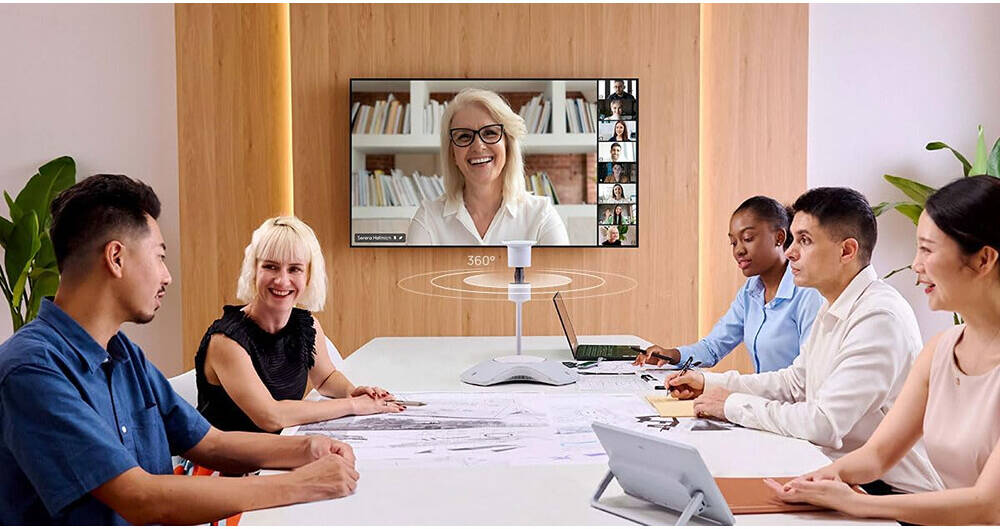
The same principle applies to audio. A visually impressive room is ineffective if remote colleagues cannot understand the discussion.
4. Improve Personal Audio for Hybrid Employees
Not every collaboration session happens inside a meeting room.
Employees frequently join calls from desks, home offices, shared spaces, or open-plan workplaces.
Professional business headsets can improve microphone clarity, concentration, and privacy.
Yealink's current headset portfolio includes wired, Bluetooth, and DECT options for different employee roles and mobility requirements. ProVAD also provides professional Yealink headset solutions in Egypt for offices, contact centres, and hybrid workers.
Discover here the ideal headset for your business.
5. Make Content Sharing Simple
Employees should not spend the first ten minutes of a meeting searching for the correct cable.
Modern meeting rooms can support:
- Native platform sharing
- Wireless presentation
- USB/BYOD connectivity
- Interactive whiteboarding
- Annotation
- Touch collaboration
Yealink RoomCast, for example, supports wireless presentation with 4K output, multi-user sharing, whiteboarding, and annotation capabilities for applicable meeting spaces.
Interactive collaboration displays can go further by combining the meeting interface, presentation screen, digital whiteboard, camera, microphones, and speakers.
Devices such as Yealink MeetingBoard Pro and Neat Board 32 are examples of integrated systems designed around collaborative workspaces rather than conventional display-only meeting rooms.
6. Improve Meeting-Room Scheduling
Hybrid offices often have fewer assigned desks and greater demand for shared meeting spaces.
If a meeting is poorly scheduled, employees arrive to discover that the room is occupied, or reserved but unused.
Room panels installed outside meeting spaces can display availability and upcoming reservations.
Yealink RoomPanel can provide room-status information and booking functions for supported Microsoft Teams and Zoom Rooms environments.
7. Build Reliable Network Infrastructure
Professional collaboration equipment still depends on the network.
A hybrid workplace may simultaneously support:
- Video conferencing
- VoIP calls
- Wireless employees
- Microsoft Teams Rooms
- IP phones
- Room panels
- Surveillance systems
- Cloud applications
Network teams should evaluate:
- Internet bandwidth
- Ethernet switching
- Wi-Fi coverage
- Power over Ethernet
- VLANs
- Quality of Service
- Firewall requirements
- Network redundancy
Collaboration devices such as IP phones, room panels, and access points may use PoE, allowing power and data to be delivered through Ethernet cabling.
For larger deployments, segmentation and QoS can help separate collaboration, voice, guest, and other business traffic.
Hybrid collaboration should therefore be planned jointly by workplace, AV, networking, and IT teams rather than assigning the entire project only to whoever purchases video cameras.
8. Centralise Device Management
A business with two meeting rooms can manage devices manually.
An enterprise with dozens of rooms across several locations needs another approach.
Administrators should be able to monitor:
- Device availability
- Firmware versions
- Peripherals
- Room configuration
- Alerts
- System health
Neat identifies remote management and simplified administration as important considerations when organisations standardise video collaboration at scale.
Learn more about Neat Pulse here.
A Practical Hybrid Collaboration Improvement Plan
| Step | Action |
|---|---|
| 1 | Audit current collaboration platforms and devices |
| 2 | Identify employee and room types |
| 3 | Standardise meeting workflows |
| 4 | Design rooms according to size and usage |
| 5 | Improve personal headsets and remote-work devices |
| 6 | Extend business telephony to remote users |
| 7 | Verify Wi-Fi, switching, PoE and internet capacity |
| 8 | Implement room scheduling and device management |
| 9 | Pilot the design with real employees |
| 10 | Measure adoption and expand gradually |
A pilot is particularly useful before standardising several offices.
Employees can identify problems with camera coverage, microphone pickup, room interfaces, content sharing, and device comfort that may not be obvious from technical specifications alone.
Why Work With ProVAD?
ProVAD provides collaboration solutions in Egypt across voice, video conferencing, IP phones, headsets, IP PBX, call centres, and modern meeting-room environments.
Its collaboration portfolio includes Yealink, Neat, and Yeastar technologies for hybrid workplaces. ProVAD is an authorised distributor for these vendors in Egypt and supports organisations with solution selection and local technical expertise.
The objective is not simply to add more collaboration devices. It is to create a consistent environment in which employees can communicate effectively regardless of location.
Planning to modernise hybrid collaboration across your offices or meeting rooms?
Contact ProVAD today to evaluate Yealink, Neat, Yeastar, and supporting collaboration solutions for your business in Egypt.
Frequently Asked Questions
What is hybrid work collaboration?
Hybrid work collaboration refers to the communication and teamwork between employees working across offices, meeting rooms, branches, homes, and other locations using shared communication and collaboration technologies.
What equipment does a hybrid meeting room need?
A professional room normally requires a camera, microphones, speakers, display, meeting-room platform or compute system, controller, and network connection. Larger rooms may require additional cameras, microphones, speakers, and displays.
How can remote workers access the company phone system?
Unified communications platforms such as Yeastar P-Series with Linkus can extend supported business extensions to desktop, web, and mobile clients.
How can businesses improve hybrid meeting quality?
Start with room design, correct camera coverage, microphone placement, professional endpoint devices, reliable networking, simple content sharing, and clear meeting practices.
How to Improve Hybrid Work Collaboration for Modern Businesses