Moving from traditional telephony to an IP phone system can improve flexibility, simplify expansion, and connect voice communication with modern business applications.
However, selecting the right system involves much more than choosing a desk phone.
A complete IP telephony environment typically includes an IP PBX or cloud calling platform, SIP trunks or another connection to the public telephone network.
For organisations in Egypt, the correct solution should be based on how employees actually communicate today and how the business expects to operate over the next several years.
Start With the Business Requirement, Not the Phone Model
One of the most common mistakes in an IP telephony project is beginning with the handset.
A desk phone is only one endpoint within the larger communication system.
Before selecting hardware, determine:
- How many employees require extensions
- How many simultaneous calls occur during busy periods
- Which departments receive the highest call volume
- Whether employees work remotely
- Whether the business operates multiple branches
- Whether receptionists need operator functionality
- Whether a call center is required
- Whether calls need to be recorded
- Which CRM or business applications must integrate
- Whether analogue devices or existing telephone lines must remain connected
- How much growth is expected
Once these questions are answered, selecting the PBX and endpoint devices becomes significantly easier.
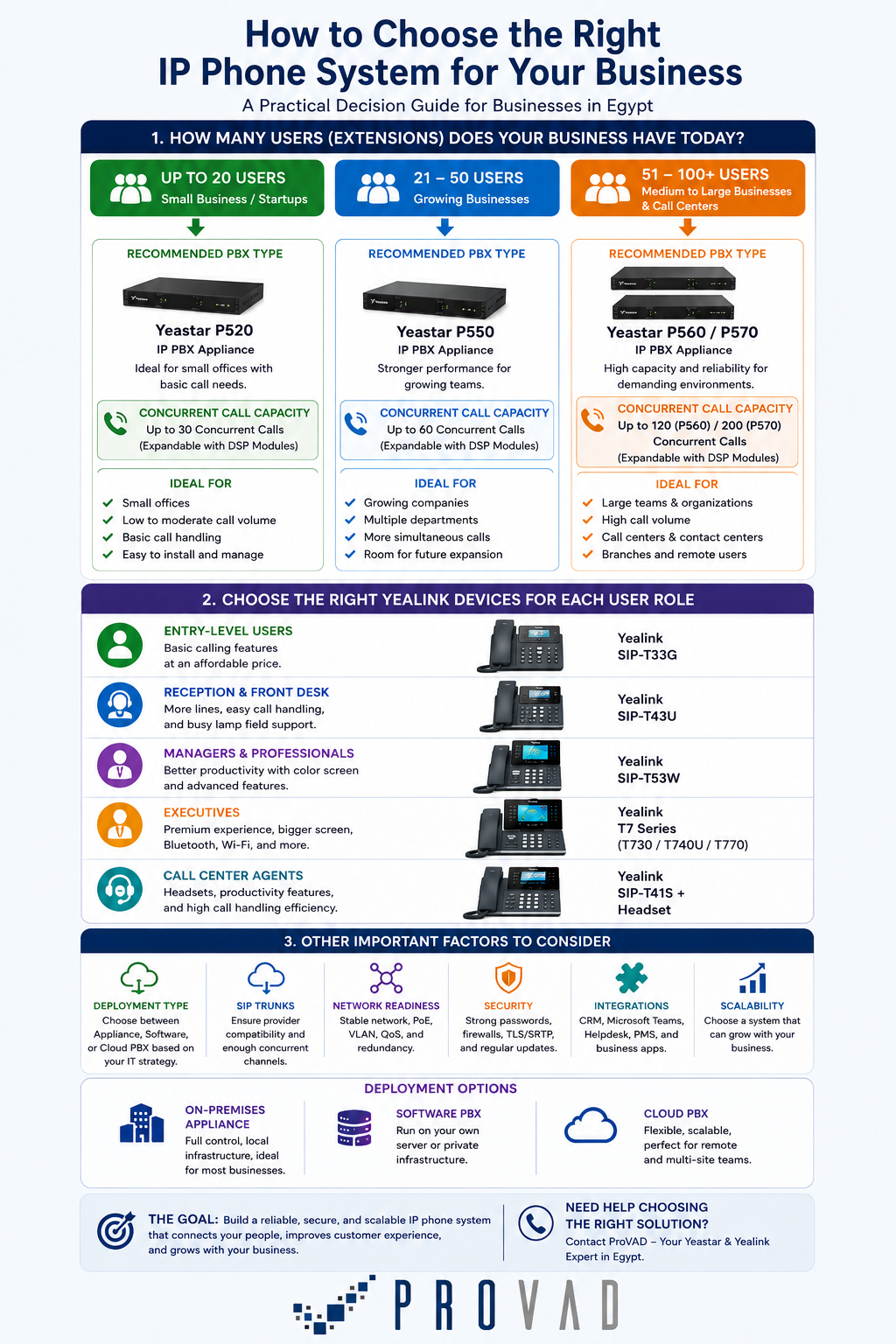
1. Determine the Number of Users
The first number to calculate is the total number of extensions.
This does not necessarily mean only employees.
Extensions may also be required for:
- Reception desks
- Meeting rooms
- Security offices
- Warehouses
- Shared workspaces
- Branch offices
- Door phones
- Conference phones
- Fax or analogue adapters
- Mobile or remote employees
The PBX should support the current number of users while leaving reasonable capacity for expansion.
Yeastar’s current P-Series Appliance Edition includes systems for different organisation sizes, while the Software Edition can scale considerably further. Yeastar states that its P-Series Software Edition supports configurations of up to 10,000 users and 1,000 concurrent calls, depending on licensing and deployment.
Discover more about Yeastar P-Series here.
Buying a system with exactly the number of extensions required today may create unnecessary upgrade pressure when the organisation hires more employees or opens another location.
2. Calculate Concurrent Calls
User count and simultaneous call capacity are not the same thing.
A company may have 100 employees but only 20 or 30 employees making or receiving external calls at the same time.
Concurrent-call capacity determines how many calls the PBX and trunk infrastructure must process simultaneously.
Consider peak periods rather than daily averages.
For example:
- A back-office organisation may have relatively low concurrency.
- A sales organisation may have significantly more outbound calls.
- A call center may require a much higher ratio of concurrent calls to users.
- A hotel or healthcare environment may experience sudden call peaks.
Yeastar, for example, differentiates P-Series capacity by both extension count and concurrent calls. P560 and P570 appliances can also increase capacity using DSP modules.
SIP trunk capacity must also be considered separately. Having a PBX capable of handling 60 simultaneous calls does not help if the service provider only allows 10 external channels.
3. Choose Between On-Premises, Software, and Cloud PBX
Modern IP phone systems can be deployed in several ways.
On-Premises Appliance PBX
A physical PBX appliance is installed at the business location.
This approach may suit organisations that want:
- Local infrastructure control
- Integration with analogue or traditional telecom interfaces
- A dedicated appliance
- Predictable local administration
- Reduced dependence on an externally hosted PBX
Software PBX
A software PBX runs on the organisation’s own server, private cloud, or supported virtualised infrastructure.
It can provide greater scalability and control for businesses with larger infrastructure requirements.
Yeastar’s Software Edition supports self-hosted deployment and allows organisations to use their own SIP trunks and compatible endpoints.
Cloud PBX
A cloud system removes the requirement to maintain the main PBX appliance at the customer site.
It can be particularly useful for:
- Distributed organisations
- Rapid branch deployment
- Remote work
- Organisations that prefer subscription-based services
- Businesses that want centralised management
The right architecture depends on IT policy, internet reliability, business continuity requirements, regulatory considerations, existing telecom infrastructure, and internal technical capability.
4. Consider Remote and Hybrid Employees
An IP phone system selected in 2026 should not assume that every employee works beside a physical desk phone.
Remote employees may need access to their business extension through:
- Desktop applications
- Browser-based clients
- Mobile applications
- Home-office IP phones
- Laptop headsets
Remote users should still appear as part of the company communication environment rather than requiring customers to call personal mobile numbers.
This can improve consistency and make functions such as transferring calls, company directories, voicemail, and presence information easier to maintain.
5. Decide Which Employees Actually Need Desk Phones
Not every employee needs the same IP phone.
Different roles require different devices.
Entry-Level Users
Basic employees may need:
- One or several SIP accounts
- HD voice
- PoE
- Call transfer
- Hold
- Conference calling
- Basic programmable keys
The Yealink SIP-T33G, for example, supports six lines, Gigabit Ethernet, PoE, HD audio, headset support, and device-management capabilities.
Reception and Customer-Facing Staff
Receptionists may require:
- More programmable keys
- Busy Lamp Field indicators
- Expansion modules
- Headset support
- Large displays
- Easy call transfer
- Multiple active lines
Executives and Managers
Senior users may benefit from:
- Larger colour displays
- Bluetooth
- Wi-Fi
- USB headset support
- Multiple SIP accounts
- More programmable keys
- Premium audio
Yealink’s current IP phone portfolio spans T3, T4, T5, and the newer T7 Series, in addition to DECT, Wi-Fi, conference, and specialised models.
The T7 Series officially became available through ProVAD in Egypt in May 2026, including the SIP-T73U, SIP-T74U, and SIP-T77U for professional and enterprise use.
Check the available Yealink IP Phones for Egyptian companies here.
6. Evaluate Call-Center Requirements Separately
A standard office PBX and a customer-service operation may use the same platform but require very different features.
Contact-center teams may need:
- Automatic Call Distribution
- IVR
- Call queues
- Skills-based routing
- Queue callbacks
- Call recording
- Agent status
- Wallboards
- Supervisor monitoring
- Performance reports
- Call disposition
- CRM integration
If customer service represents a major part of the business, evaluate these requirements during the original PBX design instead of adding them later.
Yeastar P-Series combines business telephony with customer-experience and unified communications capabilities on supported configurations.
7. Check SIP Trunk and Telecom Compatibility
An IP PBX still needs a way to connect external calls.
A SIP trunk can connect the business phone system to a telecom or VoIP service provider through an IP connection.
Before deployment, verify:
- Number portability
- DID requirements
- Simultaneous channel capacity
- International calling
- Emergency-call requirements
- Codec compatibility
- Failover options
- Internet dependency
- Existing analogue or GSM connectivity
Businesses migrating from older systems may also require gateways to retain analogue lines, GSM connectivity, fax equipment, or legacy devices.
This is one reason why the PBX should be selected together with the full telephony architecture rather than separately from the telecom service.
8. Make Sure the Network Is Ready for Voice
Voice quality depends on more than the PBX and handset.
The network must transport voice traffic reliably.
Important infrastructure considerations include:
- Stable switching
- Power over Ethernet
- VLANs
- Quality of Service
- Sufficient bandwidth
- Appropriate cabling
- Internet redundancy
- Correct firewall configuration
Modern Yealink business phones commonly support features such as PoE, VLAN configuration, QoS, and secure signalling on supported models.
A voice VLAN can help separate phone traffic from general user data, while QoS can prioritise delay-sensitive voice traffic during periods of network congestion.
The network should therefore be assessed before hundreds of phones are deployed.
9. Do Not Ignore Security
An IP PBX is part of the organisation’s IT infrastructure and should be protected accordingly.
Security planning should include:
- Strong administrator passwords
- Restricted management access
- Firewall rules
- Secure remote access
- SIP account protection
- Regular firmware updates
- Fraud monitoring
- Network segmentation
- Configuration backups
- Call-permission policies
Supported Yealink devices include security capabilities such as TLS, SRTP, HTTPS, VLANs, and authentication features depending on the specific model.
10. Consider Integrations and Unified Communications
Modern IP telephony increasingly connects with other business applications.
Potential integrations include:
- CRM systems
- Helpdesk platforms
- Microsoft Teams
- Contact directories
- Hospitality platforms
- Customer-service applications
- Business databases
Yeastar positions P-Series as a unified communications platform combining calling, meetings, messaging, customer-experience functions, and integrations across cloud and on-premises deployment models.
If a business already depends heavily on a CRM or helpdesk system, compatibility should be evaluated before choosing the PBX.
The objective should be to reduce application switching and help employees access communication information within their normal workflow.
A Practical IP Phone System Selection Checklist
Before requesting a quotation, document the following:
| Requirement | Question to Answer |
|---|---|
| Users | How many extensions are needed now and in three years? |
| Concurrent calls | What is the peak simultaneous call volume? |
| PBX model | Appliance, software, or cloud? |
| External connectivity | SIP trunk, analogue, GSM, or mixed? |
| Endpoints | How many desk phones, softphones, and mobile clients? |
| Remote work | Do employees require off-site extensions? |
| Call center | Are queues, agents, recording, and reports required? |
| Integration | CRM, Microsoft Teams, helpdesk, or PMS? |
| Network | Are PoE, VLANs, QoS, and redundancy available? |
| Security | How will PBX access and call permissions be controlled? |
| Expansion | Are new branches or employees expected? |
| Support | Who will manage, update, and troubleshoot the system? |
Why Work with ProVAD?
ProVAD is an authorised distributor of both Yeastar and Yealink in Egypt. Its current portfolio includes IP PBX, call-center, IP phone, headset, and wider collaboration solutions.
ProVAD can help partners and organisations to evaluate all requirements mentioned above to build the right communication architecture, instead of simply selecting the largest PBX or most expensive desk phone.
Planning a new IP phone system or replacing a traditional PBX?
Contact ProVAD to evaluate business phone solutions for your organisation in Egypt.
Frequently Asked Questions
What is an IP phone system?
An IP phone system uses an IP network to carry and manage business voice communication. It usually combines an IP PBX or cloud calling platform with SIP phones, software clients, trunks, and network infrastructure.
Do all employees need physical IP phones?
No. Some employees may work more effectively through desktop, browser, or mobile softphone clients, while receptionists and fixed-office users may still benefit from physical desk phones.
Is cloud PBX better than an on-premises PBX?
Neither is automatically better. Cloud PBX can simplify distributed deployment, while on-premises systems can provide greater local infrastructure control. The decision should reflect connectivity, IT strategy, security, continuity, and integration requirements.
What is a SIP trunk?
A SIP trunk connects an IP phone system to an external voice service provider, allowing users to make and receive calls outside the organisation.
Do IP phones need PoE?
Not always, but PoE is commonly used because it allows the network cable to carry both data and electrical power to compatible phones, simplifying desk deployment.
How to Choose the Right IP Phone System for Your Business