Clear communication is essential in offices, contact centers, sales departments, reception areas, and customer-support environments.
Employees may spend several hours each day answering customer calls, joining meetings, speaking through softphones, or moving between a computer, desk phone, and mobile device. A consumer headset may work for occasional conversations, but it may not provide the microphone performance, comfort, compatibility, durability, or management features required for continuous business use.
The right professional headset can help employees hear conversations more clearly, reduce the transmission of background noise, and remain comfortable during long working periods.
This buyer’s guide explains the main headset categories and highlights suitable Yealink models for common business scenarios in Egypt.
Why Professional Business Headsets Matter
Business headsets are designed around voice communication rather than entertainment alone.
A professional model may offer:
- A microphone designed to isolate the speaker’s voice
- Call-answer, mute, and volume controls
- Compatibility with softphones and collaboration platforms
- Support for desk phones or multiple devices
- Replaceable or durable components
- All-day wearing comfort
- Centralised configuration and firmware management
- Mono and dual-ear wearing options
- Microsoft Teams or unified communications variants
Yealink’s current business headset portfolio includes wired USB, QD-to-RJ, Bluetooth, and DECT models. The manufacturer also provides headset compatibility and device-management tools for business deployments.
Check Yealink headsets for business available in Egypt.
A headset should therefore be evaluated as part of the organisation’s wider communication environment, not as an isolated accessory.
What Should Businesses Consider Before Buying Headsets?
Workplace Noise
Open offices and contact centers often contain conversations, keyboard noise, air-conditioning systems, printers, and other distractions.
Dual-ear headsets can help users concentrate by covering both ears. The microphone should also reduce the amount of surrounding noise transmitted to customers or colleagues.
Active Noise Cancellation, commonly called ANC, serves a different purpose. It reduces the background sound heard by the headset wearer. Microphone noise cancellation focuses on what the person at the other end hears.
Daily Call Volume
Employees handling occasional meetings may need a different headset from agents working through continuous customer calls.
High-volume users generally need:
- A lightweight design
- Comfortable and replaceable ear cushions
- A durable headband and cable
- An adjustable microphone boom
- Simple mute and volume controls
- Reliable connectivity
- Consistent voice pickup
Wired or Wireless Connectivity
Wired models offer simple deployment, consistent connectivity, and no battery-management requirements. They are often suitable for fixed workstations and large contact-center rollouts.
Wireless models provide greater movement. However, organisations must consider charging, wireless range, connection density, device pairing, and the number of platforms each employee uses.
Computer, Desk Phone, or Mobile Device
The headset connection must match the employee’s equipment.
Common connections include:
- USB-A
- USB-C
- RJ9
- Quick Disconnect
- Bluetooth
- DECT
- 3.5 mm audio
- Electronic Hook Switch accessories
Compatibility should be verified for the exact desk-phone model, computer operating system, softphone, and collaboration platform.
Mono or Dual-Ear Design
A mono headset covers one ear and allows the user to remain aware of nearby colleagues and workplace activity. It may suit receptionists, supervisors, and employees who frequently speak to people around them.
A dual-ear headset covers both ears and can improve concentration in noisy or crowded spaces. It is generally more suitable for call-center agents, customer-support teams, and employees spending long periods in online meetings.
Recommended Business Headsets by Use Case
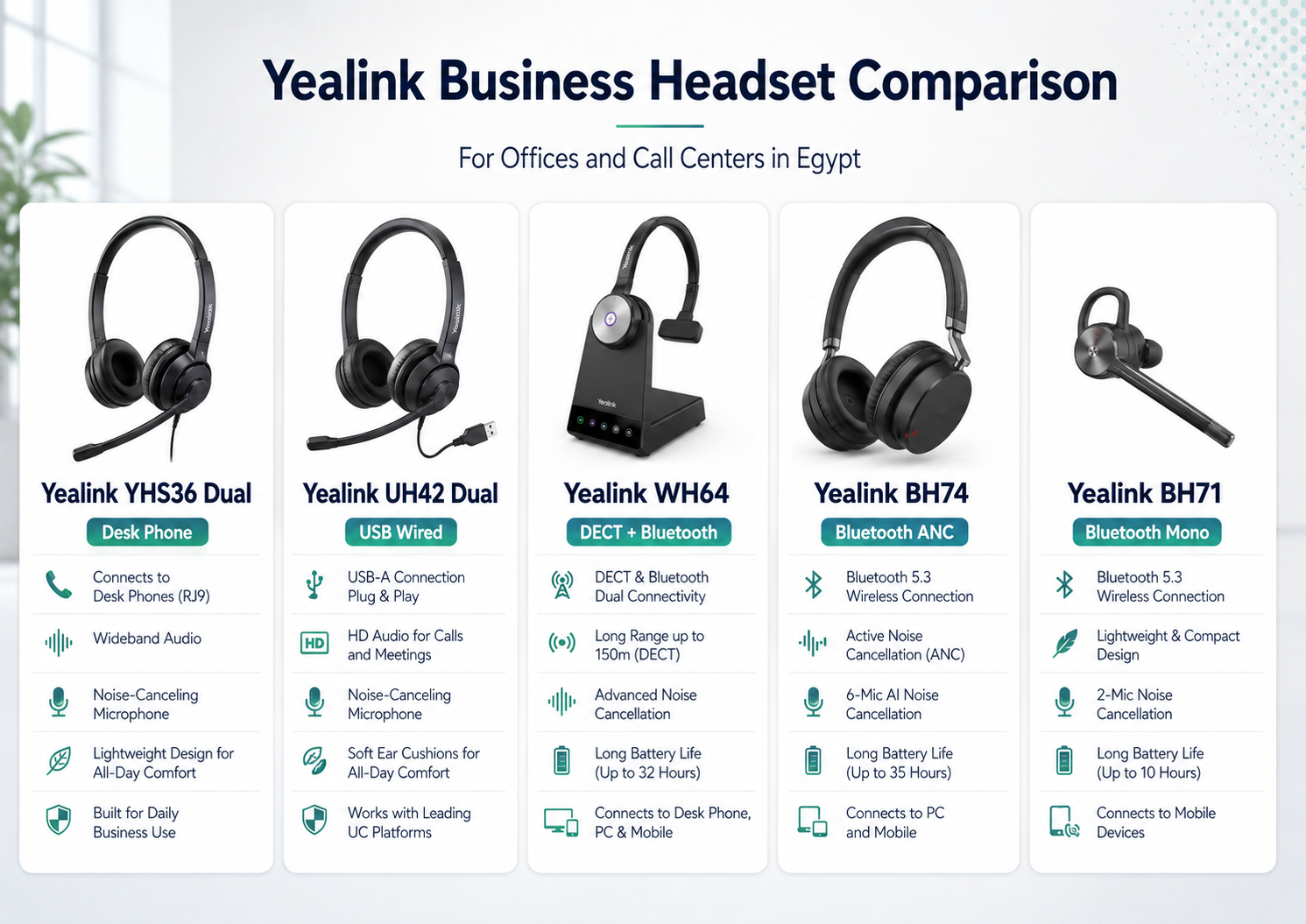
Yealink YHS36 Dual: Best for Yealink Desk-Phone Call Centers
The Yealink YHS36 Dual is a wired, over-the-head headset with a Quick Disconnect to RJ9 connection. It is designed for office workers, small offices, and call-center personnel using compatible Yealink desk phones.
Key characteristics include:
- Dual-ear wearing style
- QD-to-RJ9 connection
- Noise-cancelling microphone
- Wideband HD audio
- Passive noise reduction
- Lightweight construction
- Plug-and-play operation with compatible Yealink phones
The YHS36 Dual is a practical choice when employees work primarily from fixed Yealink IP phones and do not need direct USB or Bluetooth connectivity.
It is particularly relevant for:
- Inbound call centers
- Customer-service desks
- Reception teams
- Sales departments
- Healthcare administration
- Government service counters
ProVAD has already published a dedicated Egypt-focused guide to the YHS36 Dual, positioning it for call centers, corporate offices, healthcare administration, and other organisations with frequent voice communication.
Yealink UH42 Dual: Best Wired USB Headset for Offices and Call Centers
The Yealink UH42 is a professional USB wired headset designed for business communication across computers and supported collaboration platforms.
It uses Yealink Acoustic Shield 3.0 with a noise-cancelling microphone to isolate the user’s voice. The headset also includes professional-grade 35 mm speakers, a 300-degree adjustable boom, and a durable cable designed for everyday use. Yealink states that the UH42 is compatible with more than 100 platforms and operating systems.
Yealink WH64: Best for Wireless Office Mobility
The Yealink WH64 combines DECT and Bluetooth connectivity in a business wireless headset.
DECT can provide reliable office mobility, while integrated Bluetooth extends connectivity options for flexible work. The WH64 supports connections involving computers, compatible desk phones, and mobile phones, depending on the selected configuration and accessories.
Its business features include:
- DECT and Bluetooth wireless modes
- Three-microphone noise cancellation
- Mono and dual-ear versions
- Visual busylight
- Multi-device connectivity
- Microsoft Teams-certified and UC variants
- Compatibility with more than 100 platforms and operating systems
Yealink BH74: Best Premium Bluetooth Headset for Open Offices
The Yealink BH74 is a premium Bluetooth headset designed for hybrid work and noisy office environments.
It combines Hybrid Active Noise Cancellation with four-microphone voice noise cancellation and Yealink Acoustic Shield 3.0. The model is certified for Microsoft Teams Premium Open Office and is designed to reduce background distractions for both the wearer and the person on the call.
Other published capabilities include:
- Up to 32 hours of talk time with ANC enabled
- Up to 65 hours of music playback with ANC disabled
- Fast charging
- Soft memory-foam ear cushions
- Rotating earcups
- Optional charging stand
- Ergonomic pressure-distributing headband
Yealink BH71: Best for Mobile and Field-Based Professionals
Some employees need a compact mono headset rather than a full dual-ear design.
The Yealink BH71 is a lightweight Bluetooth headset with an adjustable ear hook and retractable microphone arm. Yealink specifies a wireless range of up to 40 metres under suitable conditions and up to 30 hours of total talk time for selected Pro configurations using the charging case.
Microsoft Teams Certification and UC Compatibility
A headset being able to produce sound through a computer does not necessarily mean it offers complete Microsoft Teams integration.
Microsoft’s certified headset catalogue includes wired, wireless, mono, stereo, Bluetooth, and contact-center options. Certified devices may support integrated Teams functions such as calling, mute controls, and a dedicated Teams button, depending on the model and connection method.
Buyers should confirm:
- Whether the model is a Teams or UC variant
- Whether certification requires a supplied USB adapter
- Whether call controls work with the selected application
- Whether the headset supports USB-A, USB-C, or native Bluetooth
- Whether firmware and configuration tools are available
Deployment Considerations for Large Organisations
Purchasing several hundred headsets requires more planning than buying individual units.
The organisation should define:
- Approved models by employee role
- Mono and dual-ear policies
- USB-A and USB-C requirements
- Desk-phone compatibility
- Replacement ear-cushion availability
- Cleaning and reassignment procedures
- Warranty and spare-unit policies
- Firmware-management responsibilities
- User training for mute and call controls
- Safe listening and volume guidance
A pilot deployment should include real users from the contact center, reception, sales, management, and hybrid teams. Their requirements are unlikely to be identical.
Need help choosing the right model for your business? Work with ProVAD
Compatibility, microphone performance, comfort, durability, wearing style, platform certification, device management, and after-sales support all affect the long-term value of the deployment.
ProVAD is an authorised Yealink distributor in Egypt and provides professional communication solutions for offices, customer-service teams, call centers, and hybrid workplaces.
Planning a new office, call-center, or unified communications deployment? Contact ProVAD to compare professional Yealink business headsets for your teams in Egypt.
Frequently Asked Questions
What is the best headset for a call center?
A wired dual-ear model is often suitable for fixed call-center stations because it provides focused listening, simple connectivity, and no battery-management requirements. The connection must match the phone or computer being used.
Is a wired or wireless headset better for office use?
Wired headsets are practical for fixed desks and large standardised deployments. Wireless headsets are better for employees who need to move around the office or connect to several devices.
Is a dual-ear headset better than a mono headset?
Dual-ear headsets help users focus in noisy environments. Mono headsets allow users to hear nearby colleagues and may suit receptionists, supervisors, and mobile staff.
What is the difference between ANC and microphone noise cancellation?
ANC reduces background noise heard by the person wearing the headset. Microphone noise cancellation reduces the environmental noise heard by the customer or meeting participant.
Which Yealink headset is suitable for Microsoft Teams?
Yealink provides Microsoft Teams-certified variants across selected wired, Bluetooth, and DECT models. The exact Teams edition and connection requirements should be confirmed before purchase.
Best Business Headsets for Offices and Call Centers in Egypt